
Thank you for your interest in running a game at CanGames! The convention wouldn’t be possible without your efforts!
Step 1 – Register as a GM at the CON-GREgATe site
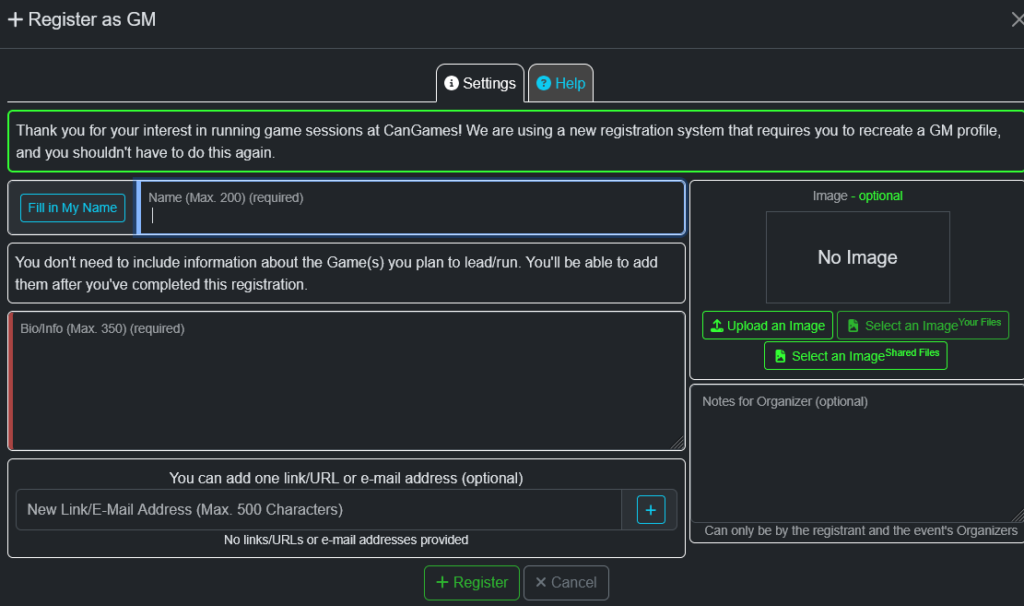
Go to the new CON-GREgATe website and sign up as a Game Master. You will only have to do this once and it will be carried over for future years. Please use the same email address for your badge purchases and your GM registration.
Step 2 – Add a Game

Now that you are registered, you can go to the front page of the CON-GREgATe system under the INFO tab and click on the “Add Game” button. That will then show a page where you can submit the information about your game.

Game Type: Please select the category that best represents the game/session you’re submitting.
Game System: Please submit the name of the rules system you are using, such as D&D 5e, Diplomacy, or L’Art de la Guerre. The text box has auto-complete enabled and might make it easy to find the system.
Event Title: For RPGs or miniatures games this should be the name of the adventure/module/encounter that you’re running. For board games, just write the name of the board game.
Info/Description: Please provide a brief description of the game. There is a hardcoded maximum of 250 characters in this field.
Minimum/Maximum Players: Please tell us the minimum number of players for you to be able to run this game, and the maximum number of players you believe the game can reasonably accommodate.
Duration: We assume that all games will take a full session slot and will take up to 4 hours in total. For shorter games, you can select a 2-hour time-slot.
Number of Instances of Game: If you would like to run the same game during multiple time-slots, move the slider. For each instance of your game, select which time-slot If there’s a particular time slot you’d like to run this game, choose it here. We will try to accommodate all requests. If you’re adding more than one copy of a game, you can pick the preferred time slot for each copy.
Links/URLs: If there’s an external website with information (manufacturer’s website, rules, background, etc) about the game you’re running, you can provide it here.
Notes for Organizers: If there’s anything else you’d like to communicate to the event coordinators about this session. This won’t be visible to anyone other than you and the CanGames staff.
Image: We encourage everyone to include an image with their game. For published games, this is usually the book cover or box image. You can select from the existing image library or submit your own as a square image that is 640 x 640 if possible.
Step 3 – Wait for Event to be Approved

Once you have added your game, the event organizers for boardgames, miniatures, or RPGs will review them and get in contact with you if there are any problems. When they are approved, they will show up in the Congregate registration system and on the simple schedule on the CanGames website. You can monitor sign-ups on Congregate under the “My Events” tab.
Step 4 – Register as a Player (optional)
If you would also like to play games during the show, please also follow the steps to register as a player and buy a badge.
Step 5 – Run your Game
Please show up to the convention at least 30 minutes before your first event to ensure that you have to get your badge and try to show up at your table 15 minutes before your game starts. If you expect to be late, please contact someone at the tournament desk. Please properly identify yourself and your game name, code, and time slot when contacting us.
At the start of your game, please get your sign-up sheet from the sign-up table in the central lobby and check the players who showed up for your game. This is very important, as you’ll need to confirm your registered players and helps us identify last-minute delays and cancellations. At your table, confirm seats are available for registered players and all players have a valid numbered badge. If registered players have not arrived by the game’s start time, you can accept alternates from the waitlist. Late arrival, even for players who reserved seats, does not need to be accommodated unless you choose to do so. Any concerns or questions from players regarding their registrations, etc., should be directed to the Tournament Desk.
Players need to have a valid numbered badge in order to play. If absentee players are not present at the start time, then you can accept alternates from the sign-up list. If you are still missing players, you may get an orange cone from the tournament desk to indicate that you are looking for more players.
During the game, have some fun! You are here to have some friendly mayhem after all. See the GM responsibilities page for more guidance.
After your game, please bring your completed sign-up sheet to the Tournament Desk to receive your GM Token. GMs can receive one GM Token each day they run a game that was submitted before May 1st. GM tokens can be redeemed for $5 off onsite purchases during the convention from the Curling Club restaurant, the bar, the vendor marketplace, or CanGames front desk. Note that no change is provided for purchases made solely with GM Tokens.